
AI Business Development for Recruitment Agencies
Every morning, every desk knows who to call and why.
The outreach is already written.
Paiger works your market overnight — scoring every account against your ICP, naming the hiring manager, and drafting the DM, the email and the call opener. You open a Day Plan, not a blank page.
Book a demo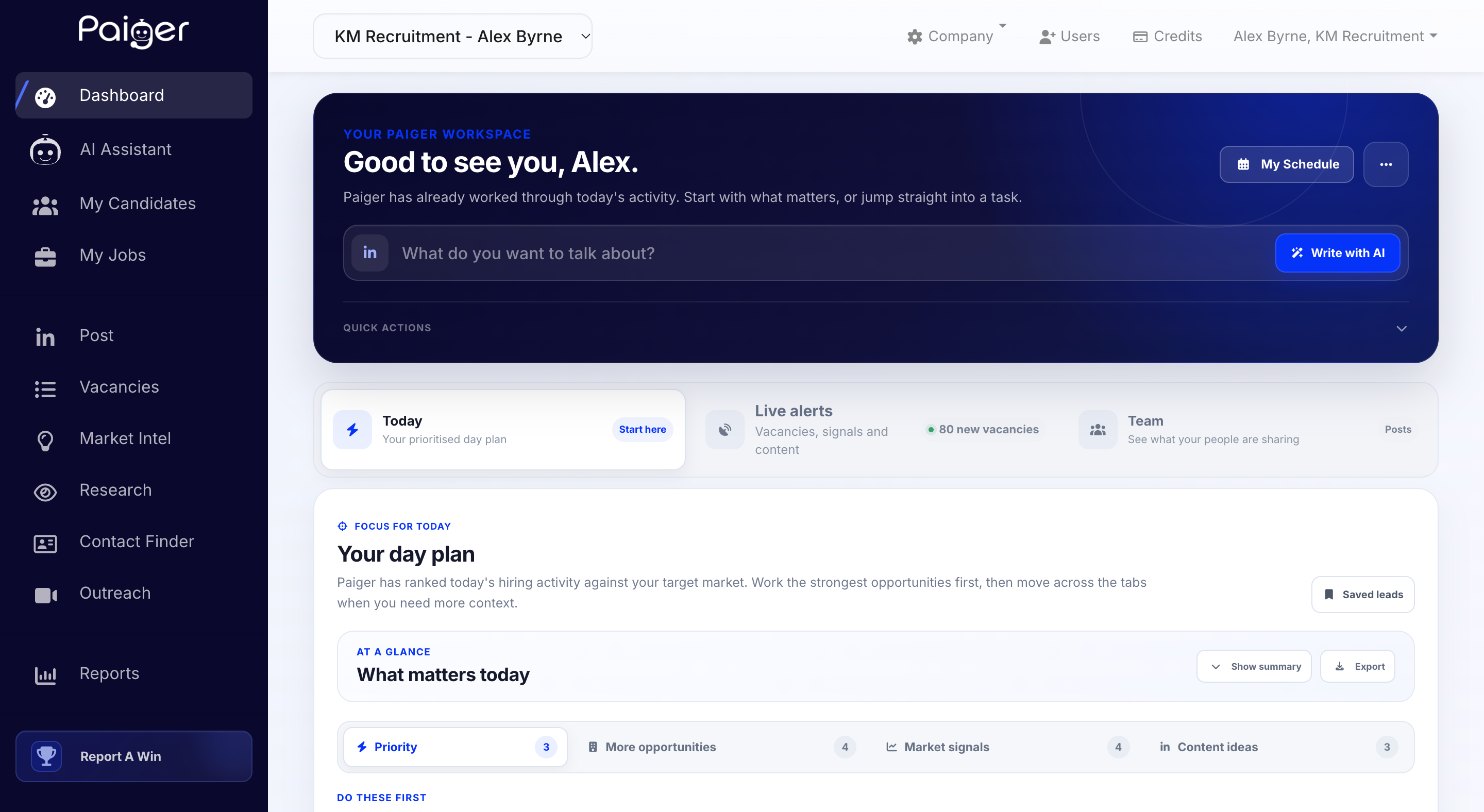
Trusted by industry leaders


WITHOUT PAIGER
You are not short of signals. You are short of hours.
Every consultant’s morning starts the same way. LinkedIn. Job boards. A Google search on a company someone mentioned in the kitchen. A CRM full of accounts nobody has touched in months. By the time they have found one worth calling, half the morning has gone — and another agency called them already.
WITH PAIGER
Paiger turns the first minutes of the day into a Day Plan.
Overnight it reads your market against the ICP you define, scores every account, and writes what you would have written.
By the time you sit down the plan is waiting.
Why now
Seven categories of business signal, tracked continuously: funding, new projects, senior hires, expansions, acquisitions, restructuring and job cuts. Add the adverts your competitors are running, and you call because something changed, not because the name came up.
Who to target
The hiring manager, named, with a confidence score drawn from cross-referenced company and LinkedIn sources. Not a company. A person.
What to say
A suggested angle picks what to lead with (speed, access to talent, specialism, urgency), then Paiger drafts the LinkedIn DM, the cold email and the call opener in your voice.
What to watch
Leadership instability, financial stress, integration friction after an acquisition. Risk signals do not take an account off your desk. They change how you open.
HOW IT WORKS
Set up your desk once. It runs every morning.
STEP ONE
Define your desk
Set your ICP once: what you recruit, the sectors and locations you cover, perm or contract. A guided builder walks you through it in a few answers, and everything downstream is ranked against it.


STEP TWO
Open your Day Plan
Every morning, your priority opportunities are ranked by who is worth your time, each with why it matters, the best first move and a suggested angle. More opportunities holds the good matches just outside your focus, so nothing legitimate slips past.
STEP THREE
Know who to contact
The named decision-makers rather than a company, with their role and how long they have been in it. Verified contact details come through Contact Finder, an add-on.


STEP FOUR
Walk in prepared
Company Research in one view: the business, its people, live jobs, signals and recent coverage, with insight on hiring, outreach, finance and risk. You open the call knowing why you are on it.
THE SCORES
Every opportunity, scored two ways.
Not a list of companies that are hiring. A judgement about how closely each role matches the desk you actually want and whether the company will use an agency, with the reason to call today.
Target Market
How closely the opportunity matches the desk you defined: sector, size, location, role type. Keeps a busy morning on the work you actually want.
Agency Fit
Whether this company actually uses agencies, read from how it has hired before rather than from hope.
Why it matters
The reason to call now, the best first move and a suggested angle, written for every opportunity rather than left to a guess.
VACANCIES
Find the roles today. Hear about the next ones first.
Live vacancies from thousands of sources, not just LinkedIn: job boards, Google for Jobs, aggregators, career sites and ATS platforms. Every live role is a company with a reason to call.
ASK PAIGER
Say what you want. Paiger finds the jobs.
Type the roles you are after, or leave it blank and Paiger searches your target market. It writes the keyword logic for you, so nobody builds a Boolean string before their first coffee.
Vacancy alerts
Save any search as an alert. New matches land on your dashboard every morning, so the next role comes to you.
Aged Vacancies
Employers with jobs open 30 days or more, oldest first. The roles they are struggling to fill, and your clearest reason to call.
Upload a CV
Working a candidate? Upload their CV and Paiger builds the search from their latest role and skills.

END-EMPLOYER PREDICTION
Your competitor’s advert is a client you do not have yet.
A staffing agency’s job advert is evidence that someone is hiring — and already paying a fee to somebody else. Paiger reads the role, the location, the technology and the language, predicts the end employer behind it, and scores how confident it is.
01
Spot the advert
A competitor advert that shows active hiring demand in your market.
02
Analyse the clues
Role, location, technology, skills and phrasing, read together rather than one at a time.
03
Reveal the end client
The company likely behind the advert, with a confidence score rather than a guess.
04
Contact the right person
The decision-maker at that company, and the angle to open with.
From a competitor’s advert, you know who the end employer is, who you need to speak to, and what you are going to speak to them about.
THE WALKTHROUGH
See how it works.
Click through the Day Plan a recruiter opens each morning: the opportunities, the research behind them and the first email already drafted. Then book a demo and we will run it against your own desk and market.


What people ask before they buy.
We already use LinkedIn Recruiter.
Could we not build this ourselves?
We already use generic AI for this.
We do not really do outbound BD.
We have plenty of jobs on right now.

Explore other workflows
Candidate Marketing
Reformat CVs to your brand, write the candidate framing, and build presentation packs that get your shortlist taken seriously.
Personal Brand & Content
Every consultant posting in their own voice, without chasing. The reach that wraps the other two.
Candidate Attraction
Every consultant’s vacancies on your website, posted to their own LinkedIn as branded adverts. Automatically, every time.